How To Round The Corners of A Shape Using Levels

This tutorial shows you how to simply and easily round of the corners of any shape, using layer masks and levels…
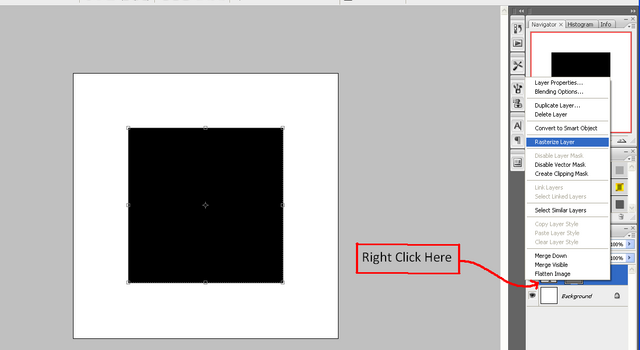
Step 1: Create a new document (the size doesn’t matter, but for this I used 500 x 500), when the document is ready make sure that you have the default colours set (although this is not essential it helps with this tutorial) and create the shape that you want to smooth the edges of (make sure that you right click and choose rasterize layer)
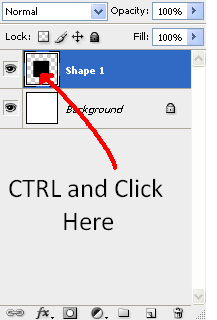
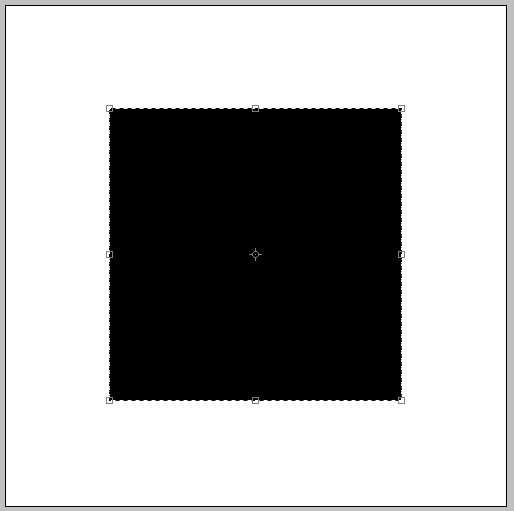
Step 2: Now hold CTRL and click on the layer in the layers tab where a preview of the layer is shown (the little box where the shape can be seen, next to the layer name) and this should select the whole of the shape, this can be seen by what look like little ants crawling around the edge:
Crawling Ants:
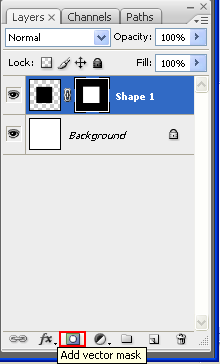
Step 3: Now go to the layers window and click the “Add Vector Mask” button as shown below:
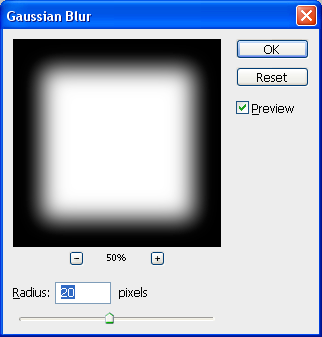
Step 4: With this layer mask selected go to Filter > Blur > Gaussian Blur and set it to a desired pixel amount (the higher the blur the bigger the curves radius, here I have used 20px)
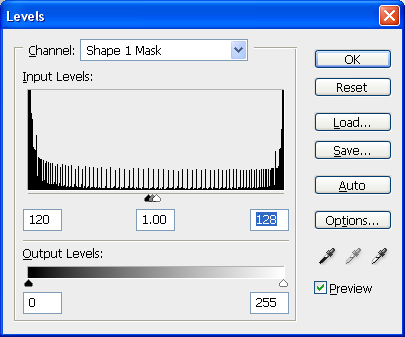
Step 5: Finally go to Image > Adjustments > Levels and play around the triangles so that you get a nice curve on the shape, try to get them all in the middle as this gives the best results, and when you are happy with the curve then press “Ok” (alternatively use the Level settings as shown below), to finish right click on the layer mask and choose “Apply Layer Mask”
Final Image:
If you have had any problems with this tutorial and would like some help then don’t hesitate to contact me either by leaving a comment below or e-mailing me at: stevie489@googlemail.com




This is a little difficult for me to follow using different versions of photoshop such as CS4 with its new adjustments panel layout. I cant seem to get apply layer mask to show up. Maybe im blind…
in cs4 u can use button below the layers pallate called ” Add Layer Mask ” this will work perfect
The tutorial seems simple, but as Aida said I can’t seem to be able to Apply the layer. The option is grayed out. The adding part works ok.